
Practice owners & managers
See what you are owed, what it cost, and what to do about both today — without becoming an analyst.
Join the waitlistWorkflows as a Service for medical practices — and the vendors that support them.
Same records for its accounting firm, billing company, IT provider, MSO, legal counsel, marketing agency, staffing partner and suppliers.


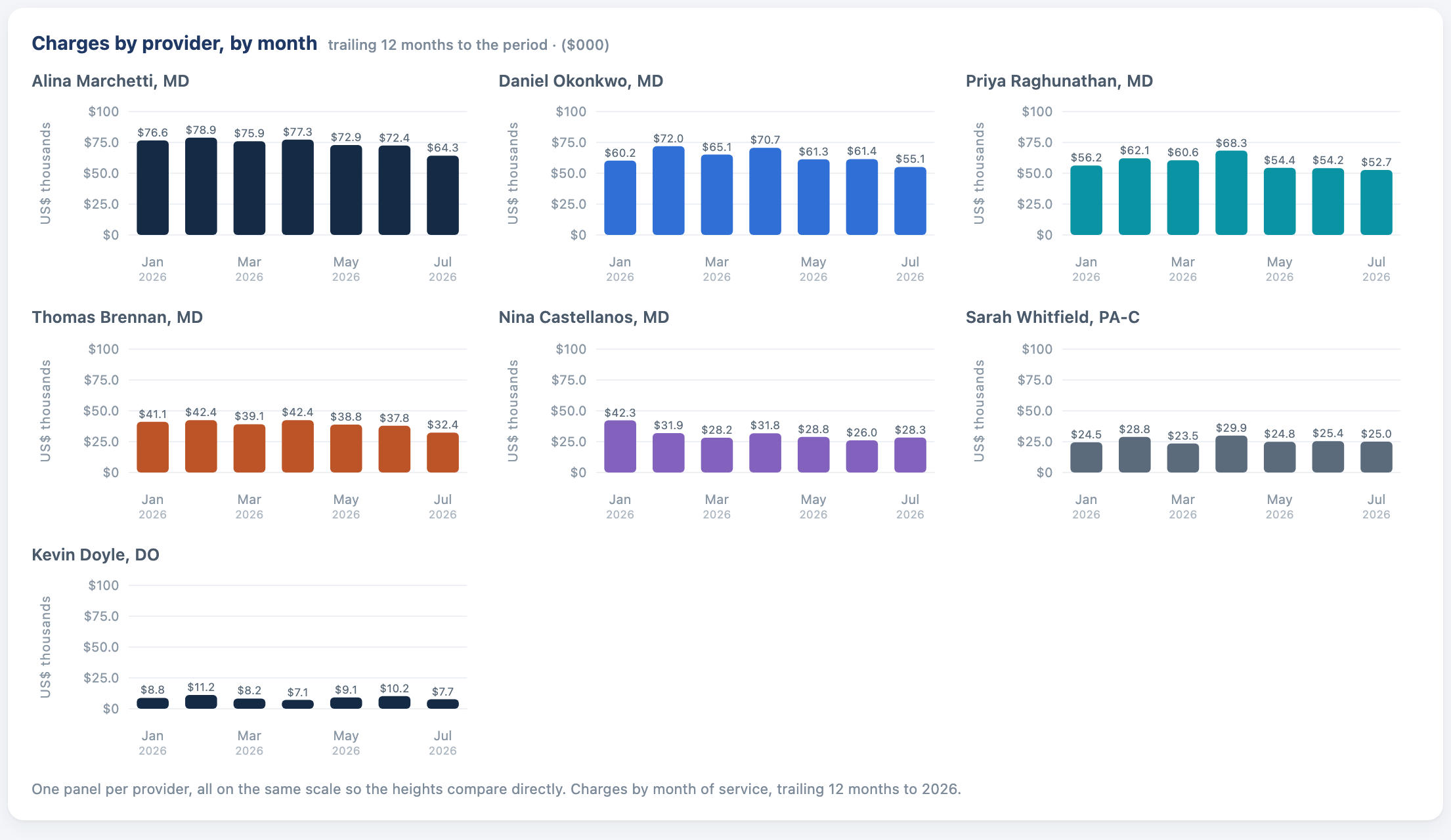
Practice overview, payor performance and per-provider charges — demonstration data.
Enter a number once and every vendor sees it. The practice, its accounting firm, its billing company and its IT provider work from the same records, so the books close faster, nothing is re-keyed, and every figure shows where it came from.
See the workflowsAccounting, billing, IT, legal, marketing, staffing and supplies. Jubilee Health reads the systems the practice already runs and gives each party a view of the same records. Nothing is re-keyed between them, and every figure shows where it came from.
Each party signs in to a view of its own, and all of them work the same rows — so the request the firm sends is the request the practice answers, and the ticket the IT provider works is the one the practice raised.
The practice decides who joins and what they see.
See what you are owed, what it cost, and what to do about both today — without becoming an analyst.
Join the waitlistEvery member practice on one chart of accounts, with the variances converted into annual dollars.
Join the waitlistYour whole client book in one workspace, and a month-end that closes on evidence instead of email.
Join the waitlistBoth sides of the practice in one place, so payments, deposits and remits tie out for real.
Join the waitlistThe onboarding pipeline and the request queue, with an age on every stage and an alarm past fourteen days.
Join the waitlistAgreements, BAAs and review dates, sitting next to the records and relationships they govern.
Join the waitlistSpend measured against arrived patients and first-year receipts, not against clicks.
Join the waitlistHeadcount, credential expiries and payroll burden read against what the practice produced.
Join the waitlistWhat is on hand, what expired, what is at or below cost, and what it runs per visit.
Join the waitlist
Each number is entered once and reaches every party that needs it. Because the practice and its vendors are connected on the same records, repetitive data entry and the repetitive tasks around it are avoided, and the work between them runs as one streamlined process.
Join the waitlistThe request the firm sends is the request the practice answers. The ticket the IT provider works is the one the practice raised. Both sides read identical figures, so nobody reconciles two versions of the truth.
Each one carries its source extract and its as-of date, and clicking an aggregate opens exactly the rows it counted. When something is not known yet, the page says so instead of showing a zero.
Follow-up, unsigned notes, patient recall, document requests, deadlines and IT tickets each arrive as a queue with counts, owners and ages. The day starts with a list rather than a search.
Allowed amounts checked against your own fee schedules, so a payor drifting below contract is a report rather than a suspicion. Unbilled revenue sitting in unsigned notes, and A/R past ninety days, both come with a worklist.
Workflows as a Service
This is what the name means. A workflow starts in one seat and finishes in another, and the record travels instead of the message.
1
Step 1 of 5
The charge lands with its provider, service date and CPT.
Practice
The visit is charged
Dashboards fail when nobody trusts the figures. Each one here carries the file it came from and the date it was pulled, and clicking it opens the records underneath.
That standard binds the AI too. Recommendations cite the rows behind them, drafts wait for a person to approve them, and anything a model wrote is labelled as drafted rather than passed off as measured.
Collections, trailing 12 months
$2,847,310
Opens the 4,212 payment lines this figure counts
Demonstration data.
Around ninety controls across eight domains, mapped to HIPAA, SOC 2 and NIST 800.
Tell us which seat is yours and we will open it in order. It costs nothing, and no connection between two parties is ever charged for.
We will use what you send to contact you about the pilot, and for nothing else — no list, no sharing, and we delete it whenever you ask.
We have your seat recorded and will be in touch as it opens. Nothing else happens until then.